


 Sign in
Veeam Cloud Connect in Croatia
Veeam Cloud Connect - offsite backup for Veeam environments
Store backups of virtual and physical servers and workstations in a remote cloud repository in Croatia, without building your own DR site. Protect VMs with the Veeam console, and protect computers and servers with Veeam agents whose licenses are included.
- End-to-end encryption and WAN acceleration
- VMs: your own Veeam license or a license from us
- Servers and workstations: agent licenses included
- Croatian data centre with 24/7 support


Cloud Connect for Veeam environments
Is Veeam Cloud Connect the right choice?
Veeam Cloud Connect stores offsite backups in a cloud repository in the Croatian data centre. You protect VMs with the Veeam console (with your own license or a license from us), and you protect servers and workstations with Veeam agents that you manage from our customer portal.
We recommend Veeam Cloud Connect for
- Companies with a Veeam Backup & Replication console and a VMware or Hyper-V environment
- Environments where it is easier to get a Veeam VM license from us
- Individual servers and workstations that you protect with Veeam Agent, license included
- Projects that need WAN acceleration and end-to-end encryption
If you're protecting one or two VPS or dedicated servers and want a simple agent with cPanel/WHM integration, R1Soft is usually a faster gateway to cloud backup.
Licensing
Which Veeam license do you need?
The license depends on what you protect. You protect VMs at hypervisor level from the Veeam console, and those VMs need a Veeam license. For servers and computers where you install Veeam Agent, the license is included in the service.
VMs with your own license
You already have a Veeam license in your console. You only pay for our Cloud Connect service and space in the repository.
- You use your existing Veeam Backup & Replication console
- You manage the license and its renewal yourself
- Cheapest if you already own the licenses
In the configurator: number of VMs labelled "my license"
VMs with a license from us
You do not have a Veeam license, or you prefer not to manage one. You get a license for each VM from us, together with the service.
- Download the VM license from our customer portal
- Add it to your Veeam console and start protecting VMs
- You pay for the license with the service, per VM
In the configurator: number of VMs labelled "+ Veeam license"
Servers and computers, license included
For every machine where you install Veeam Agent, the license is already included. It is counted by operating system.
- Server OS (Windows Server, Linux): "Number of servers"
- Desktop OS (Windows 10/11, macOS): "Number of workstations"
- This also applies to a regular VM where you install the agent directly
Veeam console is not required
You do not pay for the same machine twice. If you protect a VM from the console at hypervisor level, it is a virtual server and needs a Veeam license (yours or ours). If you install Veeam Agent on it, it counts as a server or workstation based on its operating system, and the license is included.
Configuration
Veeam Cloud Connect Backup
Choose the number of virtual servers to back up and the size of the backup repository. If you need more space later, simply request a capacity increase.
*You can expand your backup space to suit your needs at any time
How to get started
From order to first backup in 4 steps
You download and manage everything you need from our customer portal. After you order, you can start straight away.
-
Order
Choose licenses and space
Choose the number of VMs (with your own license or a license from us), the number of servers and workstations, and the size of the repository.
-
Servers and workstations
Download Management Agent
In the customer portal, download the management agent for Windows, Linux or macOS and install it on the computers you want to protect.
-
Servers and workstations
Install backup agents
Install Veeam backup agents from the portal on computers that already have the management agent. The license is included and is counted by operating system.
-
VMware / Hyper-V
Connect the console and protect VMs
Add our Cloud Connect to your Veeam console. If you got the license from us, download the VM license from the portal and add it to the console.
If you only protect servers and computers, steps 1 to 3 are enough and you do not need the Veeam console. If you only protect VMs from the console, skip steps 2 and 3.
Cloud Connect
What is Veeam Cloud Connect?
Veeam Cloud Connect provides a fully integrated, fast and secure way to store backups in a service provider's cloud repository. You connect from your Veeam console over an SSL/TLS connection to dedicated storage in a Croatian data centre.
Data access and restore are done from the Veeam console or Veeam Agent. Protect servers and workstations without a console with agents you install from our customer portal. You can monitor storage use and increase capacity as the project grows.
- Hosted offsite backup for physical and virtual servers
- Control and restore from the Veeam console or agent
- Dedicated cloud repository
- No need for your own remote infrastructure

Your backups are stored outside your local infrastructure in the service provider's storage.

Communication between the Veeam console and Cloud Connect takes place over an encrypted connection.

Backup Copy with built-in WAN acceleration speeds up transfers to the cloud.

Forever incremental backups and a GFS retention policy in one product.
Architecture
Offsite backup with WAN acceleration
Veeam technology includes Backup Copy with built-in WAN acceleration, forever incremental backups and a GFS (grandfather-father-son) backup retention policy - all in one product.
This gives you a modern backup architecture without having to build and maintain remote infrastructure yourself. You can increase repository capacity as your project grows.
- Backup Copy to a cloud repository
- WAN acceleration for faster transfers
- Forever incremental model
- GFS retention policy
Security
End-to-end data encryption
Encrypt your data before it leaves your environment, while it is being backed up and in the repository where the copy is stored. Encryption works alongside built-in compression and WAN acceleration without adversely affecting the data reduction ratio.
The SSL/TLS connection between the Veeam console and Cloud Connect infrastructure provides additional protection for communications. MyDataKnox stores data on enterprise equipment in a Croatian data centre.
- Encryption before data leaves your environment
- Encryption in transit and at the repository
- SSL/TLS connection to Cloud Connect
- Compatible with compression and WAN acceleration
Data protection from the source to the cloud repository.

Offsite storage in a Tier3 data centre near Zagreb.
Prerequisites
What do you need for Veeam Cloud Connect?
To protect VMs at hypervisor level, you need a Veeam Backup & Replication console that connects to Cloud Connect. VMware and Microsoft Hyper-V are supported. You connect over SSL/TLS to dedicated storage in our data centre.
For individual servers and workstations, the console is not required. A management agent and Veeam Agent are enough. You download and install them from our customer portal.
- VMs: Veeam Backup & Replication console and VMware or Hyper-V
- VMs: your own Veeam license or a license from us
- Servers and workstations: management agent and Veeam Agent, no console
- Dedicated space in the repository in our data centre

Required to protect VMs at hypervisor level. Servers and workstations are protected with agents, even without the console.
Supported virtualisation platforms for backing up virtual servers.
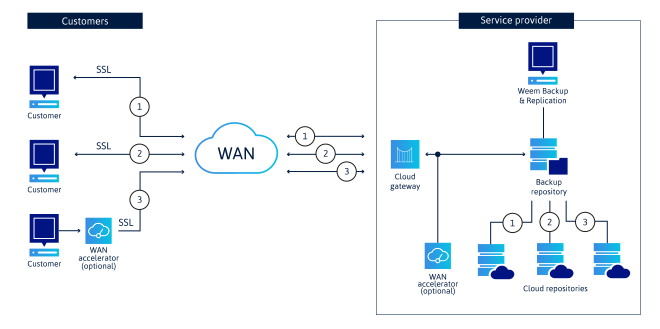
How a VM environment connects to Veeam Cloud Connect
The Veeam console in your environment connects via a secure SSL/TLS connection to our infrastructure, where you lease dedicated space for backup data. Servers and workstations with Veeam Agent send backups to the same repository.
If you need a complete Veeam solution, send us an inquiry here
Still looking for the best solution for your business?


Do you need help?
Get in touch with us. Our team of professionals is available 24/7.
We’ll be happy to answer any question you might have and get to work.